Bill of Materials (BOM)
Create a Bill of Materials (BOM), sometimes called a recipe, that defines what components are consumed to produce a target item.
Before You Start
Section titled “Before You Start”- Output item already exists.
- Component items already exist.
- Units of measure and expected batch size are known.
-
Navigate to Manufacturing > BOMs.
-
Click New BOM.
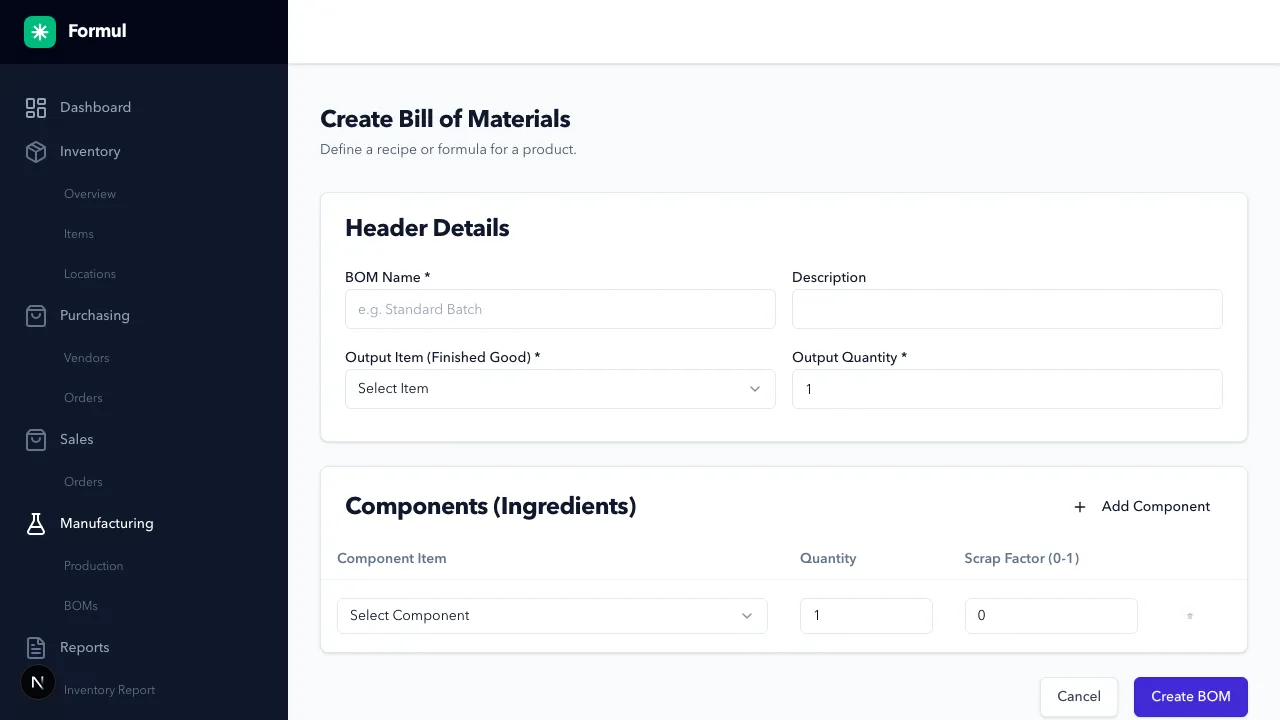
-
Select Output Item.
-
Enter Output Quantity for the batch standard.
-
Add component lines with required quantity.
-
Save the BOM.
Expected Result in Formul
Section titled “Expected Result in Formul”- BOM is available for work order creation.
- Component requirements are calculated from target production quantity.
Why BOM Design Matters
Section titled “Why BOM Design Matters”- Output quantity defines your production standard and drives scaling math.
- Component quantities directly determine shortage detection and material consumption.
- Bad BOM definitions cause either over-consumption (inflated cost) or under-consumption (false stock confidence).
If Something Looks Wrong
Section titled “If Something Looks Wrong”- Ensure all components are valid inventory items.
- Ensure no duplicate or zero-quantity component lines.
Next Step
Section titled “Next Step”Execute production in Work Orders.