Monitoring Stock
Monitor current stock by item and location so replenishment and allocation decisions are accurate.
Before You Start
Section titled “Before You Start”- Inventory transactions exist for the items you want to review.
- Location hierarchy is configured.
-
Open Reports > Inventory.
-
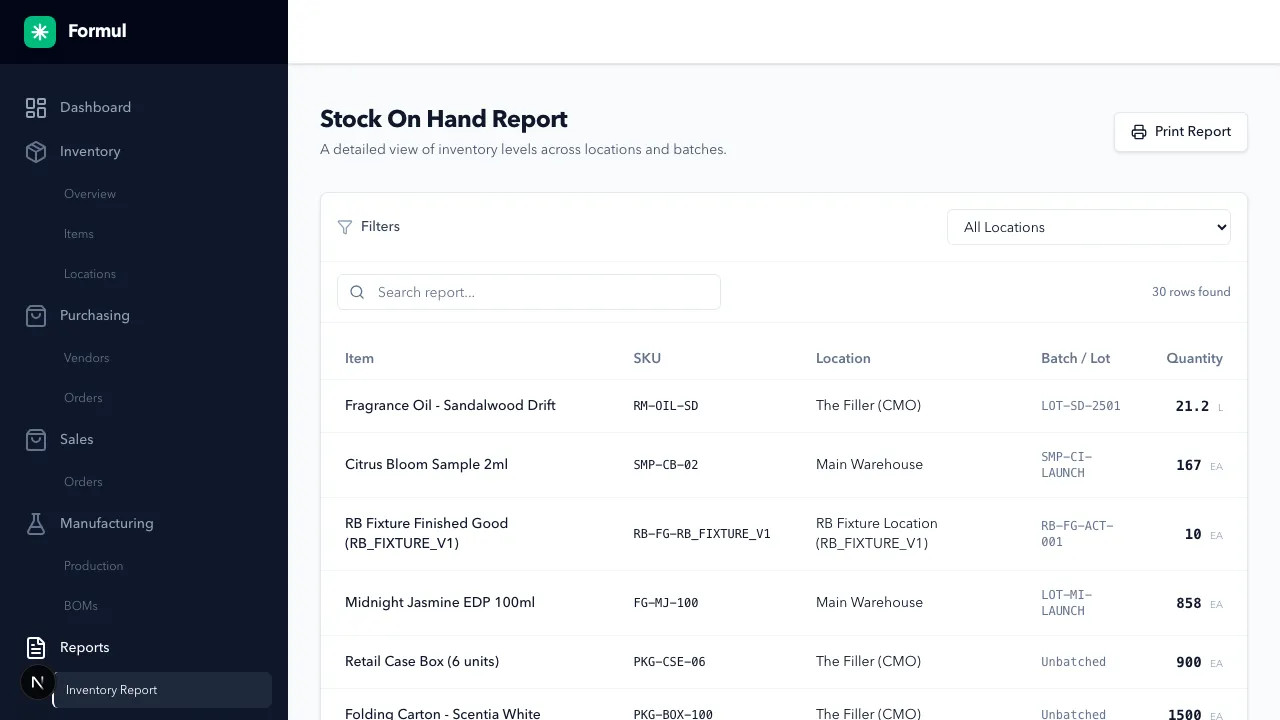
Use the Location filter to scope results (all locations or a specific location tree).
-
Use Search report… to narrow by item, SKU, location, or batch/lot.
-
Review table fields shown on this report:
- Item
- SKU
- Location
- Batch / Lot
- Quantity
-
Apply a parent location filter to inspect hierarchical rollups.
Expected Result in Formul
Section titled “Expected Result in Formul”- You can identify current stock constraints by item and location.
- You can identify which batch/lot and location currently hold quantity.
Why This Report Matters
Section titled “Why This Report Matters”- Use location-level quantity to decide whether to transfer stock versus replenish externally.
- Use batch/lot visibility to resolve fulfillment and traceability questions quickly.
- Use filtered views by location tree to spot where stock is concentrated or stranded.
If Something Looks Wrong
Section titled “If Something Looks Wrong”- Confirm location filter scope includes child locations when expected.
- Cross-check against recent receipts, transfers, production, and shipments in the ledger.
Next Step
Section titled “Next Step”Review financial value impact in Inventory Valuation.